Guide · Sports
Billiards Tips and Strategy
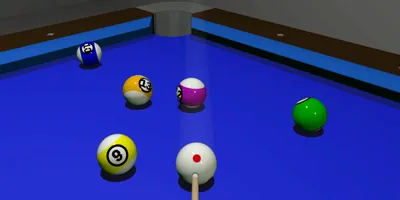
Billiards is a 3D pool game that opens straight onto a racked table, ready to break. These tips come from a short session in the browser with a 9-ball rack and an 8-ball rack, using the Hit button, the power bar and the camera views.
- Place the cue ball before you break. At the start the cue ball has four small arrows around it and a Place Ball button. You can drag the ball to a new spot first, then press Place Ball to lock it in.
- Set power by clicking on the power bar along the bottom. The percentage on the bar changes to match where you click. In testing, clicking near the left third gave 37 percent and clicking near the right end gave 100 percent.
- Use a softer shot when the object ball is close. A 78 percent shot at a nearby ball sent it all the way across to the far cushion.
- Switch to the top-down view before aiming a long shot. The camera button in the bottom right corner cycles views, and the top-down one shows the whole table with a faint aim line running from the cue ball.
- Hold an arrow key to turn the cue. Holding the Left or Right arrow key swings the aim around the cue ball quickly, so let go early and check the aim line before you shoot.
- Drag across the table for small aim changes. A short sideways mouse drag nudged the cue a little, which is handy after a rough turn with the arrow keys.
- In 9-ball, check which ball the cue points at after each shot. In testing the cue lined up on the 1 ball, the lowest one on the table, before every shot.
- A full-power break spreads the rack well but did not pot anything in testing. Do not expect a ball to drop on the break every time.
Place the cue ball, pick a camera view, set the power on the bar and turn the cue with the arrow keys or a drag before you press Hit. Softer shots are easier to control when the balls are close.
What a short session looked like
The game started on a blue table with nine balls racked in a diamond for 9-ball. After placing the cue ball, the view moved behind it and the Hit button appeared. A 65 percent break spread the balls without potting any. A row of small circles at the top grew by one after each shot, under the name Anon and a score of 0.
Choosing 8-ball from the help menu opened the creator's own 8 ball pool page, and its Play 8 Ball Pool Online button started a fresh rack of 15 balls in a triangle. A 100 percent break scattered them across the table, again with nothing potted.