Guide · Sports
Billiards - Frequently Asked Questions
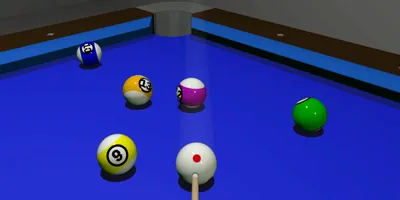
How do you shoot in Billiards?
Aim the cue with the Left or Right arrow key or a sideways drag, click on the power bar at the bottom to set strength, then click the Hit button on the left side of the screen.
What does the Place Ball button do?
Before the break the cue ball can be dragged to a new spot. Clicking Place Ball fixes it there and switches the view to behind the cue ball, ready to aim.
How do I change the power of a shot?
Click on the power bar along the bottom. The percentage updates to match where you clicked. In testing it went from 65 percent to 37 percent near the left third and to 100 percent near the right end.
Can I see the table from above?
Yes. The camera button in the bottom right corner cycles through a view behind the cue ball, a raised view of the whole table and a top-down view with the aim line showing.
Which game types does Billiards have?
The help panel lists 8-ball, 9-ball, 3-cushion, Snooker and Sagu. The game opened on 9-ball in testing, and 8-ball was also tried. The others were not checked.
Is there a computer opponent?
None was seen. During testing every shot stayed with the same player name, Anon, and no other player took a turn. The help panel has a Lobby button, which was not opened.
Where can I see all the controls?
Open the three-line menu in the bottom right and click the info button. The Controls section lists mouse actions and keys for aim, power, spin, camera and full screen.