Guide · Sports
Billiards Beginner's Guide - How to Get Started
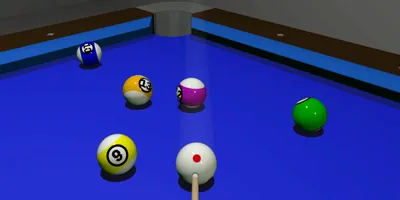
New to this Billiards game? Here is what you see when it loads, how to take your first shot and where the other game types are.
What is Billiards?
Billiards is a free 3D cue sports game by tailuge that runs on the creator's site and is embedded on Pixelsprout. It loads straight onto a pool table with a rack ready to break, and in testing that first rack was 9-ball. You place the cue ball, aim the cue, set the power on a bar at the bottom of the screen and press Hit. Balls roll, slow down on the cloth and bounce off the cushions. The help menu lists other game types, including 8-ball, 3-cushion and snooker.
First steps
- Wait for the table to load. The cue ball has four small arrows around it and a Place Ball button sits on the left.
- Drag the cue ball if you want it somewhere else, then click Place Ball.
- The view moves behind the cue ball. Click the camera button in the bottom right if you would rather see the table from above.
- Hold the Left or Right arrow key to turn the cue until the aim line points where you want.
- Click on the power bar to set how hard to hit. The default was 65 percent.
- Click Hit and wait for the balls to stop before lining up the next shot.
Who it's for
Players who want a full 3D pool table in the browser and are happy to take their time lining up each shot with the camera and aim controls.
Finding the other game types
Click the three-line button in the bottom right, then the info button with the letter i. The panel that opens has a Play section with buttons for 8-ball, 9-ball, 3-cushion, Snooker, Sagu, Map, Reveal and Lobby, and a Controls section below it.
Only 8-ball was tried. It opened the creator's 8 ball pool page first, and the Play 8 Ball Pool Online button there loaded a new table with 15 balls racked in a triangle. The other buttons were not tested.